Cant Crop Photo to Upload on Facebook
If you are a Facebook user, changing or uploading a Facebook Profile Motion-picture show of your choice seems like an easy task. However, there are many questions that may come up to your mind similar how to become the correct Facebook contour motion picture size, how to upload profile picture in full size without cropping information technology or changing contour picture without loosing likes.
In this detailed guide, nosotros are going to cover the consummate tips and tricks to answer all of these questions.
This post volition requite you a ton of information to simplify your life on Facebook – every bit far as profile picture is concerned.
The reply to some of the questions needs a flake of workaround. That's just the way Facebook is at the moment, requiring some complicated steps even for simple tasks.
Also, the fact that Facebook constantly makes changes and tweaks to its interface can brand things a flake more confusing. But let'due south clear that.
Facebook has two images that sit on your main profile- Profile Picture which is displayed in circle shape and the Cover Photo which is the rectangular shaped banner similar image. You lot can enhance the look of your Facebook profile past choosing the right size and quality for these images.
Starting time, allow'south accost the the basic question about what size or dimensions to use for Facebook Contour Picture and why does it get cropped. Permit'due south reply this.
Contents-Inside This Mail
What's the Facebook Contour Pic Size and why does it get cropped?
The Facebook Profile picture is displayed in the following dimensions:
- 180 by 180 pixels- For Desktop / Laptop view
- 128 by 128 pixels- For Mobiles
Note, that this is the size in which the contour picture is displayed and not what is uploaded or stored in Facebook.
Y'all can really upload a film of any size. Simply the minimum width needs to be 180 pixels.
While the dimensions make it expect simple, getting the right image size tin be disruptive. Because when yous upload the Facebook Profile picture show in a normal fashion, information technology gets cropped and saved in foursquare shape automatically (there are some piece of cake hacks to upload without cropping discussed beneath)
And the way the cropping is done is that it volition crop the top or width (whichever is more) – to make information technology equal to the size of smaller side to form a foursquare. For eastward.1000. if image size is 720 (w) x 480 (h), it will crop the width to make the image a square of 480(west) 10 480(h). This is bold you don't do zoom-in while uploading the pic.
If you choose to apply full zoom, the photograph volition exist cropped 180 by 180 which is the default display size ignoring both dimensions of original pic.
Withal, when information technology is displayed on your profile or in your posts, information technology takes the shape of a circle with diameter equal to 180 pixels.
So ideally, yous should choose a square contour picture with yourself in the middle so that the prototype looks good fifty-fifty when its displayed in smaller format the mobile.
Allow's at present respond the question on how to upload Facebook contour picture in full size (no cropping):
How to Upload Facebook Contour Movie without Cropping
Yous can upload Facebook Profile Picture without cropping in full size using the Facebook Classic Interface on Desktop. To skip cropping on mobile, become to 1000.facebook.com using mobile browser, then upload the image every bit a post on your timeline and use the "Brand Profile Moving picture" choice beneath the mail service, which will make the image equally your Profile Picture without cropping.
Permit's talk about these ways in detail:
Way 3 is a preferred selection for iPhone mobile users.
- Way 1- Use Facebook Classic Interface – Upload the image and use the "Skip Cropping" selection (on Desktop)
- Way 2- Use Facebook Lite App on Mobile – Upload the epitome as a post on timeline and then use "Make it Contour Picture" option (suitable for Android users since Facebook Light App is currently not available in Apple App store)
- Way 3- Become to thou.facebook.com– Login and upload the image as a post on your timeline. Then use "Make it Profile Picture" option (works best for both iPhone and Android mobile users)
Lets talk almost the details and steps involved for each of these ways.
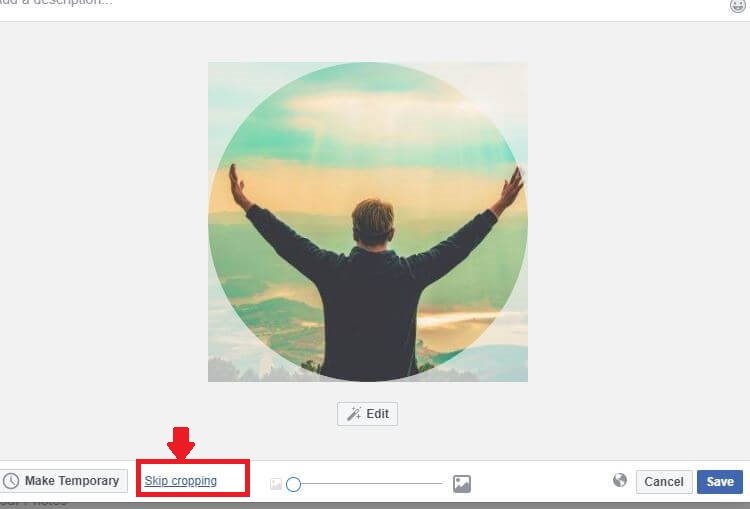
Way i- Use Classic Facebook Interface on Desktop and use 'Skip Cropping' Option while uploading Profile Picture
Update: The "Classic Facebook Interface" on desktop has been discontinued recently by Facebook and is non working for many users.
Some users have been using third party Google Chrome extensions like "Switch to Classic blueprint on Facebook" etc. which helps you lot to go back to Facebook Classic interface. All the same, I am not certain on the safety aspects of these extension. You tin can endeavour Ways two and 3 if y'all don't want to use this.
For the first way, you demand to utilise the Classic Facebook Interface on Desktop. This gives you a ready made option to "Skip Cropping" when uploading the Facebook Profile Picture. Surprisingly, this useful option is taken abroad from the New Facebook Interface.
Also Read: How to Brand Facebook Photo Albums Private 2021
Manner 2- Using Facebook Light App on Mobile- Upload the image equally a mail on your timeline and apply "Make it Profile Picture" selection which will skip cropping [for Android]
(Note that this option is NOT available on Chief Facebook App for some reason. As mentioned earlier, Facebook Lite app is currently not bachelor for iPhone users , so utilize Mode 3 instead unless you already accept the Calorie-free app downloaded)
Step ane-Open Facebook Calorie-free App and upload or post the image you want to use as "Profile Picture" on your timeline.
While posting, yous can go on the privacy settings to "Only Me" (since this is a temporary posting which you tin can hide later)
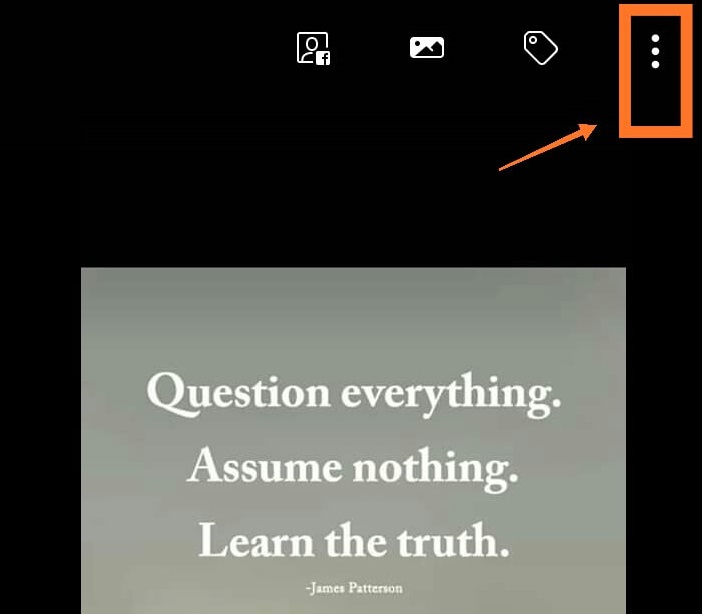
Stride 2– Next open this paradigm mail in full view. Click on 3 vertical dots on summit right of image
Also Read: How to Poke on Facebook Lite 2021 [Easy Guide]
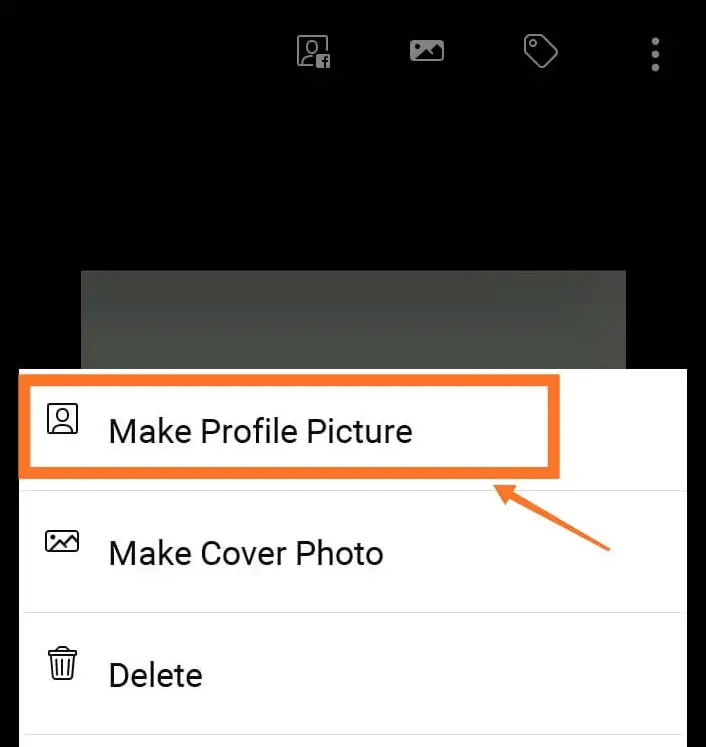
Step 3: You volition encounter an choice "Make Profile Picture" . Tap on it and ostend. You volition see that the whole epitome becomes your Profile Moving-picture show without any cropping done.
Also Read: How to make Facebook Avatar [Consummate Guide about this Cool Feature]
Mode 3- Upload the image every bit a post on your timeline and then utilize "Brand it Contour Pic" choice on m.facebook.com, which will upload full image without cropping [For iPhone and Android Users]
This is some other method to avert cropping similar to the Style 2.
This hack works groovy for Mobile (Android or iPhone). Use following steps-Login to your m.facebook.com on your mobile (even works on laptop) using Google Chrome or any other browser
- Stride i- Upload the image you want to use as "Profile Picture" as a prototype post on your timeline. While posting, you can proceed the privacy settings to "Only Me" (since this is a temporary posting which you can delete later)
- Footstep 2- Click the epitome you posted on your timeline to open up it in total and you will see an option to "Make information technology Profile Picture" BELOW the image. Tap on it
- Step 3- Next it will enquire if you desire to Switch back to original profile picture after some time menstruation. Merely click on 'Never' meaning you lot don't desire to switch back
- Step 4- Yous can at present see the full image is posted without whatsoever cropping equally the Profile Moving picture.
You tin can delete the image mail service at present that the profile motion picture is updated.
Also Read: How to Search Facebook Posts by Engagement, Month, Year [Easy Method]
How to Alter Facebook Profile Picture show without Notifying Anyone / Alter Contour Picture without Posting
When you change your Facebook Profile Moving picture, there is auto-post on your timeline which mentions your profile picture is updated. You tin switch the privacy setting for this detail post immediately from "Public" to "But Me" which ways only you will be able to come across this post .
Steps to alter Facebook Profile Picture show without notifying anyone
- Add the photo every bit a mail to your timeline. While calculation yous accept an selection change the post privacy settings to "Only me"
- Click on the photo in this post and click on the option "Make Profile Picture"
- Your Profile Pic will exist updated with this photo and at that place will be an auto-post about the update. Now immediately become to this auto-mail and change the privacy settings of this post to "But me"
In fact when y'all delete a picture from Facebook Contour Pic Anthology, it also deletes the auto-post from your timeline.
Also Read: How to Detect Liked Posts on Facebook 2021 [Easiest Guide]
How to Change Facebook Profile Motion picture without Loosing Likes
Got a bunch of likes and comments on your Facebook Profile Picture which y'all don't want to cede by irresolute. Well, the thing is with Facebook, y'all don't really lose the likes and comments. The likes and comments stay along with the original picture which is stored in your Facebook Profile Moving-picture show Album .
So in case you moved to your new Picture show that doesn't get the kind of likes and comments as your onetime one, you lot can e'er switch back to the old profile Pic past going to the Facebook Profile Pic Album and selecting it from there (Don't do a fresh upload of old profile moving-picture show which will cause you to lose the likes and comments)
As well Read: How to Mail GIFs on Instagram Story [All Easy Ways]
Other Important Points on Profile Pic
Facebook Contour Moving-picture show Baby-sit
Facebook Contour Motion picture Guard is a great feature to protect your privacy. If yous turn it on, Facebook does not requite an option to download your Facebook Contour Pic for any other user. A random user will also not go any option to share, send in message or share your profile pic externally.
It likewise avoids the possibility for anyone to tag your profile film, unless the person is your friend.
When you turn on the Facebook Profile Picture Guard, information technology adds a blue edge to your profile pic and also shows a shield symbol.
Steps to add Contour Picture Guard
- Go to m.facbook.com
- Click on your contour picture to aggrandize it
- Click on option to "Plow On Contour Picture show Guard" below the epitome
- Y'all will see that your profile film is now wrapped in blueish edge and also has as shield symbol in the bottom heart
Also, check this postal service which gives you lot all the ways to make your Facebook Photos and Anthology private.
Facebook Profile Picture Ideas
You lot tin can get creative with your Facebook Contour Picture using a number of ways. Many people mix the encompass photo and profile moving picture to blend seamlessly. You can also add effects or blueprint using the "Add Frames" option which is bachelor when you click on update contour picture.
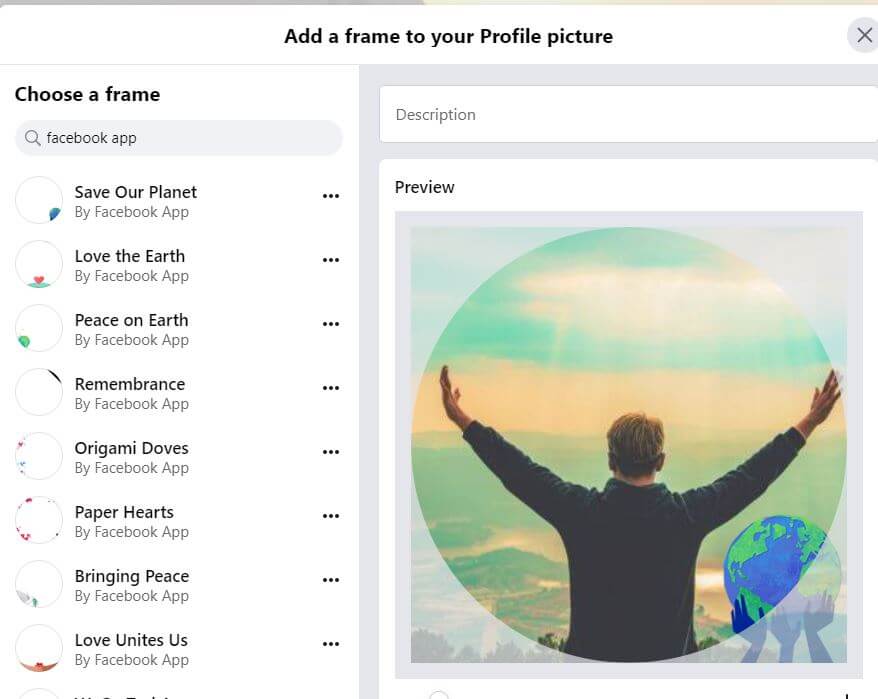
In instance you desire to keep it private, here are some ideas you lot can use for having Facebook Profile Picture without face-
- Drawing image of yourself
- Facing your back epitome-Looking towards something scenic
- Lid pulled downward look-covering your face
- Having a motivational- quotes with images flick
- You lot can even utilize the new feature Facebook Avatar– create your ain animated Avatar and utilise information technology in Facebook Profile Movie.
Hope you find this commodity helpful. Exercise share it with your friends and family unit to assist them become their Facebook Profile Picture right.
barnesforphopeeks.blogspot.com
Source: https://www.infoabsolute.com/complete-facebook-profile-picture-guide/
0 Response to "Cant Crop Photo to Upload on Facebook"
Post a Comment